Overview
How might we…help residential property owners across the US use technology to manage their properties more efficiently, transforming a single owner into a team of property managers?
Problem
Managing residential rental properties independently is highly challenging due to the demands of tenant relations, maintenance, and legal compliance. Property owners must handle tenant screening, rent collection, and maintenance requests, which can detract from other responsibilities and lead to stress. Poor management in these areas can result in tenant turnover, vacancies, and legal disputes, all of which are costly and time-consuming.
Legal compliance adds complexity as landlords need to stay updated on housing laws to avoid penalties. Financially, managing vacancies without professional strategies can lead to longer vacancy periods and reduced rental income. These multifaceted responsibilities can be overwhelming, causing significant stress and potential burnout for property owners.
Alternatives like property management software, part-time assistants, leasing agents, and reliable contractors can alleviate some burdens. However, each option involves costs, such as software fees ($30-$200 per month) and leasing agent commissions (typically one month's rent). While these alternatives offer some relief, they also require ongoing oversight and financial outlay, necessitating a careful cost-benefit analysis by property owners.
Building empathy
Finder Owners

Navigating the challenge of finding rental property owners on a large scale was a unique and unfamiliar roadblock. After spending the previous eight years trying to secure apartments in the competitive New York City market, I decided to leverage my experience and turn to Craigslist, a platform I was already familiar with.
I developed a compelling pitch, presenting myself as a college student to gain the trust and interest of property owners. This approach proved effective in opening doors and starting conversations.
Participant Pipeline
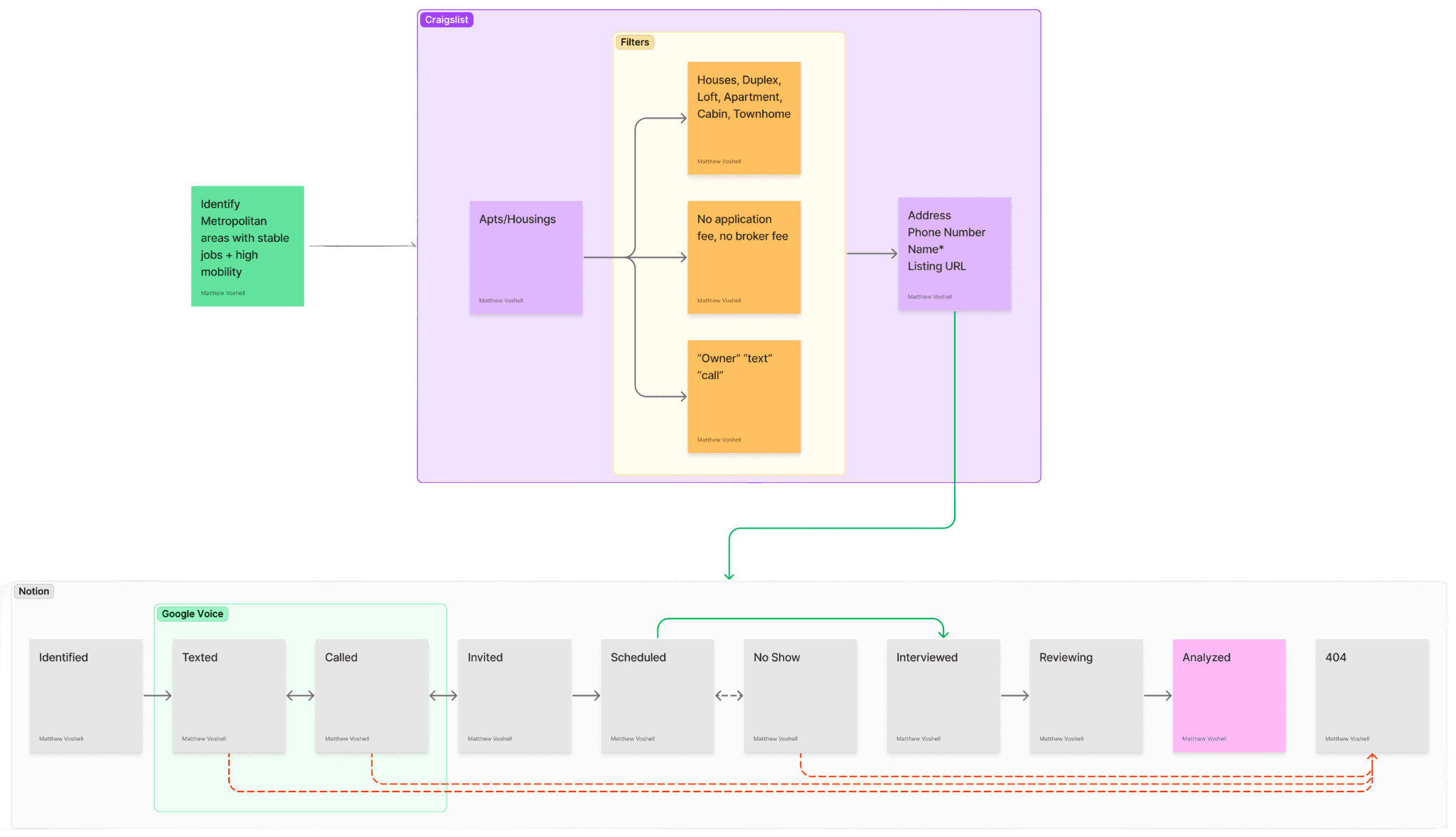
Using Craigslist, I filtered listings for various types of housing, including houses, duplexes, lofts, apartments, cabins, and townhomes, ensuring there were no application or broker fees. I focused on listings with keywords like "owner," "text," or "call" to directly connect with property owners.
The next step involved collecting essential contact information from the listings, such as addresses, phone numbers, names, and URLs. This information was then entered into the pipeline for further action.
Using Google Voice, I reached out to these contacts through text and calls, inviting them to participate in interviews. The pipeline tracked each stage: from initial identification and contact to scheduling, interviewing, and reviewing responses. The process ensured efficient follow-up, including managing no-shows and conducting in-depth analysis of the gathered data.
What I learned
Property owners, from various professions, engage in real estate as a side hustle. Whether teaching or practicing law, real estate development remains secondary. Even in finance or niche businesses, like stockbroking or industrial ownership, real estate offers supplemental income or investment potential.
Interview quotes
Lisa in Washington D.C. on leasing causes
"I wish I had known how important it is to stay one step ahead of my tenants. Now, with 40 years of experience, I can anticipate almost everything they might do.
There are no surprises anymore. For instance, I once got a call from a neighbor in Georgetown, where my properties are located, yelling about a satellite dish on his roof. I was confused because I didn't install it, but one of my tenants had, thinking the reception was better from the neighbor’s roof. Now, my leases include clauses like not attaching anything to a neighbor's property, not installing anything on roofs without permission, and not putting in tanks so big they could damage the floor. I also provide a list of house rules for every property. This way, I stay one step ahead of potential issues."
Jen in Sacramento, CA on the move-out process
"Once I know someone is giving notice, which is rare, I prepare for the move-out process. Recently, I had two tenants move out—one got a job at Disney World, and the other was not paying rent, so I suggested he find another place.
One was a one-bedroom unit downstairs, and the other was a two-bedroom, one-bath unit. I put up a sign in front of the property, received about 150 calls right away, and rented both units within two days. After renting them out, I collect the deposit and the first month’s rent. I provide the rental agreement and go over a checklist with the new tenants to ensure everything is in order. If they notice anything I missed, I have my handyman fix it. When they move out, we review the checklist again and I only deduct from the deposit for damages beyond normal wear and tear.
I believe in being a fair landlord, so I don’t charge for normal wear and tear like carpet cleaning. However, I once had a tenant who installed a huge stereo system and drilled a hole in the ceiling for a projector. That required significant repair, so I charged for it because it was beyond normal wear. I typically charge one month’s rent as a deposit, even though legally I could charge up to two months. I think one month is a reasonable amount for tenants to manage."
Brian in Miami, FL on accepting payments
"We prefer to handle most payments electronically or through bank drafts. That's our preferred method. Initially, we used to receive checks, but now we've switched to electronic payments, which makes it much more seamless for us. It's easy to check the app and see if a payment has been made. If not, I send a friendly reminder, letting the tenant know that there will be a charge against their security deposit and a notice if the payment isn't received. It's a lot less hassle because you know right away, rather than waiting for a check to arrive.
We use our bank's electronic system to monitor payments. If a tenant hasn't paid, I send a text, and if there's no response, I follow up with a call. This method is very effective and handy. Each property has its own account, which makes it easier to manage."
Journey

Initially, rental property owners acquire properties by evaluating potential investments, considering factors like location, market trends, and property types such as houses, duplexes, lofts, apartments, cabins, and townhomes. This involves thorough research and financial analysis to identify profitable opportunities. In the build phase, they construct new buildings or enhance existing ones, adding amenities and modern design elements to increase value and attract tenants.
The renovation and repair phases focus on maintaining and improving properties over time. Renovations ensure competitiveness, while repairs address issues to preserve condition and value. During the operation phase, owners manage day-to-day activities, tenant interactions, rent collection, and maintenance, ensuring tenant satisfaction and steady cash flow.
Finally, in the divest phase, owners sell or transfer properties, realizing their investments' returns. Each stage is meticulously tracked to ensure efficient management and strategic decision-making, optimizing property value and investment returns.
Types

This diagram outlines the stages of rental property ownership, categorized into specific phases. In the Getting Started phase, new owners acquire rent-ready properties and develop foundational management skills. As they gain experience, they move into the Growing Portfolio phase, acquiring, renovating, and operating additional properties to increase value.
In the Builder phase, owners focus on developing new properties from the ground up by acquiring parcels and constructing buildings. For those looking to exit, the Divestiture phase involves operating properties while preparing for sale. Finally, in the Boss Mode phase, experienced owners manage all aspects of property management, including acquisition, building, renovation, operation, and divestiture. This comprehensive approach reflects a seasoned mastery of the rental market.
Design
Why Elastic UI?

Elastic UI provides a robust library of flexible components designed for intricate data structuring, which is essential for real estate management. Property owners often need to organize and navigate multiple properties based on various criteria such as region, type, locality, and tenant details.
Elastic UI's system is particularly well-suited for this, offering intuitive navigation and seamless organization that simplifies these complex tasks. Additionally, Elastic UI adheres to best practices in accessibility and responsiveness, ensuring that the app remains user-friendly across different devices and user needs.
Features
Designed to streamline property management, from advertising vacancies to managing tenant move-ins and move-outs. Each tool is crafted to enhance efficiency, improve tenant satisfaction, and simplify the complexities of property management.
Property Landing
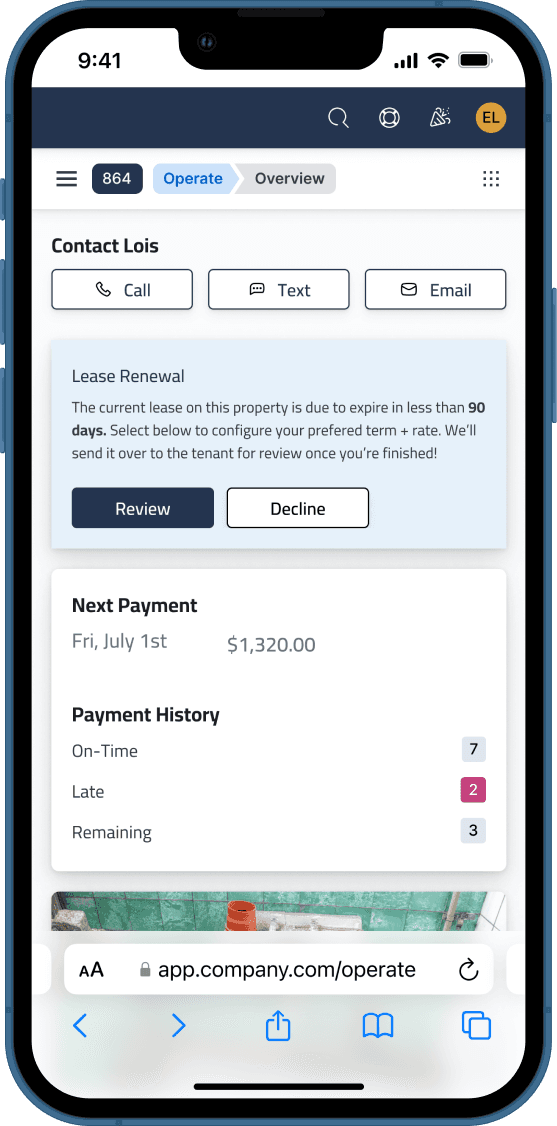
Access all essential information in one place: contact tenants, review actions, verify payment history, track repairs, and review documentation. This centralized hub ensures efficient property management.
Move-Out

Prepare properties for new tenants by having departing tenants complete a checklist, take photos, and assign tasks. This proactive approach ensures timely and efficient property turnover.
Advertising

Boost your property's visibility by enabling free listings across multiple platforms like Realtor.com and Apartments.com. Track listing statuses with live and pending indicators to maximize exposure and attract potential tenants quickly.
Availability

Set and customize times for host-guided or self-guided tours, ensuring flexibility for each day of the week. Adjust or remove time slots as needed to accommodate changing schedules, streamlining the scheduling process.
Queue

Manage your tenant application queue efficiently. Review applicants' background results, including employment, credit score, criminal history, and references. Easily contact applicants via call, text, or email, and track their status under Active, Accepted, or Rejected tabs.
Showings

Easily schedule and manage property tours. Define available time slots for showings and allow prospective tenants to book appointments directly. This feature ensures a smooth and efficient showing process.
Leasing

Effortlessly set lease terms by choosing between month-to-month or fixed-term leases. Specify start and end dates, confirm your selections, and finalize the lease agreement. This streamlined process simplifies lease management.
Make Ready

Track active and completed jobs to ensure properties are rent-ready. Schedule and monitor services such as carpet replacement, with detailed contact information and job timelines. Stay informed about ongoing maintenance work to ensure timely turnovers.
Move-In

Review each room and decide on necessary actions such as cleaning, painting, repairing, or replacing items. Accept the current condition or schedule tasks to prepare the property for the incoming tenant, ensuring a smooth transition and high tenant satisfaction.